Ever wanted to earn money just by sitting at home clicking a bunch of buttons? Well if thats the case then you came to the right place. You can read my posts on Banners Broker to understand how it works. Here is the whole strategy for download in PDF format.
Multiple Guides
Tuesday, January 1, 2013
Complete Banners Broker Strategy
Ever wanted to earn money just by sitting at home clicking a bunch of buttons? Well if thats the case then you came to the right place. You can read my posts on Banners Broker to understand how it works. Here is the whole strategy for download in PDF format.
Monday, December 31, 2012
A VPN is a network that uses primarily
public telecommunication infrastructure, such as the Internet, to
provide remote offices or traveling users access to a central
organizational network.
VPNs typically require remote users of the network to be authenticated, and often secure data with encryption technologies to prevent disclosure of private information to unauthorized parties.
VPNs may serve any network functionality that is found on any network, such as sharing of data and access to network resources,printers ,
databases, websites, etc. A VPN user typically experiences the central
network in a manner that is identical to being connected directly to the
central network. VPN technology via the public Internet has replaced
the need to requisition and maintain expensive dedicated leased-line
telecommunication circuits once typical in wide-area network installations .
VPNs typically require remote users of the network to be authenticated, and often secure data with encryption technologies to prevent disclosure of private information to unauthorized parties.
VPNs may serve any network functionality that is found on any network, such as sharing of data and access to network resources,
Making the connection
First go to "Control Panel".
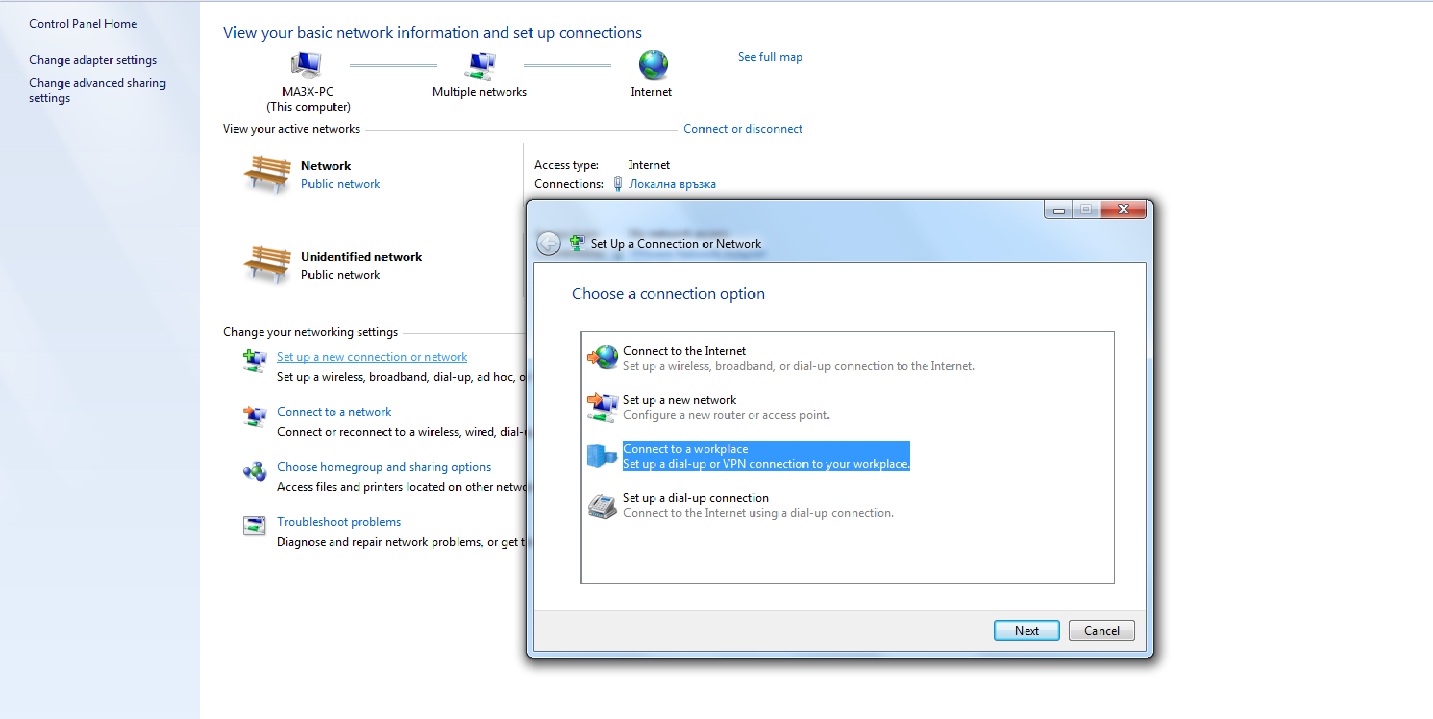
Next open Network and Internet->Network and Sharing Center in Control Panel.
Afterwards click "Create a New Connection".
Then click "Connect to a workplace" and then "Use My Internet Connection VPN"
Click "Next" and then fill in the box "Internet Address: vpn.vpnreactor.com" and in the "Destination Name: VPNReactor"
Then on the next page you type in your account and password
Lastly click "Connect" and it should connect you to the VPN.
For every other time use this icon in the bar with the clock.
Saturday, December 22, 2012
Get Someones IP Address Through Facebook
Step 1: Go to blasze.com/iplog
Step 2: Type in any Link in the "Enter URL or Tracking Code" Box
Step 3: Click Create URL
Step 4: Copy the link they give you and write down the access code somewhere
Step 5: Go to facebook.com
Step 6: Type in link in your status. Wait till the Facebook Crawlers grab the real URL secretly going to a malicious site.
For example, if you type in youtube.com in the "Enter URL or Tracking Code" Box. Then you type in the malicious link in the status. Facebook crawlers would go to that link and think its really Youtube and it will show youtube.com in the message below, even when it secretly is a link from blasze.
Step: 7: Delete the link from blasze and keep the youtube message below. When people click on it, they will go to youtube.com, but actually they clicked on your malicious link
Step 8: Go back to blasze.com/iplog. Type in the access code in that "Enter URL or Tracking Code" Box. There you will have their IP if someone clicks on your link. You will also have the Facebook crawler IP's too
Backtrace Keyloggers and RAT's
Now all keyloggers and RATs are sending data to the hacker in regular intervals (usually every 5 to 10 minutes) by using one of the two methods below:
1. Using the Emails: where hacker configures his email ID and password while creating
2.
If we monitor all data packages we can easily scan for one of these and then we'll have the hackers email info or FTP info. What can we do with this, you might ask; highly skilled hackers obviously won't allow this as they create a completely seperate email or
Wireshark is a very famous network scanning hack tool which is used by hackers or network forensic experts to monitor the packet flow of their network cards like Ethernet or WLAN. It records each and every packet coming and going out of your system's Network card. Packets is just a bunch of data.
Whenever you feel anything suspicious in your system like your system is compromised or you are infected follow the steps below prior to removing the keylogger or RAT from your system.
Steps to reverse engeneering the email or FTP servers password:
1. First of all download and install Wireshark. You can easily get this simply by Googling it.
Note: While Wireshark is getting installed, ensure that it installs the Winpcap with it otherwise it won't work properly.
2. Now go to the "Capture"-button in the top menu of the Wireshark and select the interface (means your network card which can be Ethernet or WLAN).
3. It will now start capturing the packets through that Network card. What you have to do is just keep capturing the records for atleast 30 minutes for getting the best results. After x time, stop capturing the packets.
4. Now you need to filter your results, for this go to the filter box and type FTP and SMTP one by one. Note: if you get records for FTP then hacker has used FTP server and if you didn't get FTP that means the hacker has used SMTP, so give SMTP in Filter box.
5. As you scroll down you will find the “FTP username” and “Password” for victims ftp account in case FTP server is used. And if hacker has used SMTP then you will find "email address" and its "password" that hacker has used to create the server.
Expose Facebook Stalkers
Expose your Facebook Stalkers
Getting a sorted list of the ones who've visited your profile page the most is easier than it might seem; you don't need
1.
Make sure you're logged into your Facebook account.
2.
Open the source page of the web page of Facebook by either right clicking, then 'View page source' or simply go to the following link:
view-source:www.facebook.com
3.
Search the page for the following words: InitialChatFriendsList
4.
Right after this keyword you'll see the following: {"list":["1111111111","2222222222",...,"9999999999"]}
These numbers are the Facebook ID's of your friends; the first number is the one who've visited your profile page the most and so on.
5.
Go see who the specific person is by going to the following link, replacing the X's with the ID's found.
www.facebook.com/XXXXXXXXXX
Protect Yourself Against Phishers
1. What is phishing?
- Phishing is the method of stealing login info(usernames and passwords) by directing the slave to a clone(fake) login page, that logs the login info without the knowledge of the slave.
- Such clone
website is known as a phisher.
- Use your login info in the correct places only.
Don't ever put your login info anywhere else than the page you registered to, unless it's atrusted service you know(such as youtube or blogger asking for your google account's info). - Make sure the website you're logging in isn't fake.
Whenever you login to a website, if you didn't type the URL(address) of the website yourself, i.e. if you clicked a link that led you to the login page(from message, website, search engine results), always check the url(address) to see if you're in the right place.
For instance, if you're logging in your facebook account, make sure the url appears as http://www.facebook.com/...
Where a phisher page would look like http://www.facebook.freewebs.com/... or http://www.facebook.spam.com/... or any url whose part before the .com isn't exactly the same as the page you want to login to. - Make sure the links you're clicking aren't fake.
Whenever you're clicking a link, check where the link goes before clicking it. Links can be masked to appear as something else than the page they're leading to. For example, www.google.com leads to yahoo instead of google. Fortunately, in most browsers, whenever you point your mouse cursor over the link, the true location of the link is displayed on the bottom left part of the screen. Try it with the above link.
This is particularly important because it can protect you from another, rarer but more dangerous method called cookie stealing, which is basically automatically stealing your account if you're previously logged in the website. - Know that links to phishing pages are usually spread via email, and
often represent impersonating trusted services and persons, such as
making
the email appear as it's sent from the website you've registered to, or a friend of yours whose account has been compromised.
- Report the phisher as soon as you can.
- Report the phisher's address here:
http://www.google.com/safebrowsing/report_phish/ - If the phishing attempt has been done via message, report the message in any of the following services:
http://www.reportphish.org/forwardphish.php
http://www.us-cert.gov/nav/report_phishing.html - If you received the message from a friend's compromised account, inform your friend, and other friends that might be in danger.
- If possible, inform the admin of the website/forum that the phisher is made for.
Banners Broker Upgrading and Rolling Up
What is a Banners Broker upgrade?
Many people join Banners Broker with a particular package and after doing some research, they realize that they should have bought a higher package.
So taking this human trait into consideration, Banners Broker has given us a limited time window in which new people who have purchased a package, can upgrade their package to a higher one.
This time limit is 3 weeks from the date of first purchase.
You can upgrade multiple times but it has to be done within that 3 week period.
A lot of people realizes once they see the money in their BB back office increasing that they should have bought a higher package as it would be more beneficial because you get higher value complimentary panels, which you won’t receive at any other time after your initial package purchase. So if you want to make the most out of free stuff, the initial purchase is the time to do it. After that, you won’t get stuff for free.
Personally, I bought a green package when I started. Then I realized that I would be better of upgrading to a red package. If my money hadn’t been tied up I would have chosen the black package! DOH!
So if you can afford to, I would advise going for nothing less than a green package (ideally a red or black but I know these may be out of a lot of peoples price range).
A Roll-Up is something optional which you may want to do after you weigh up the options as to which panel is more beneficial.
If you have 3 panels of the same color, you can elect to swap all of them for one of the next higher color.
If you ever want to do this, go to Purchase >> Roll Up Panels and then perform the action. But, make sure it’s worth doing before taking this step.
That’s all for the Banners Broker breakdown. Hopefully, you now have enough information to execute your business with enough knowledge to see you through.
If you wish to make the most of your money and time, then look at the strategies section of this guide.
Subscribe to:
Comments (Atom)